
Documentation menu
Purchase and registration
NetworkTuna starts with a 14-day trial in which every feature works. To keep using it after the trial, buy a license on this website and enter the registration code you receive in the app. A license is a one-time purchase, not a subscription.
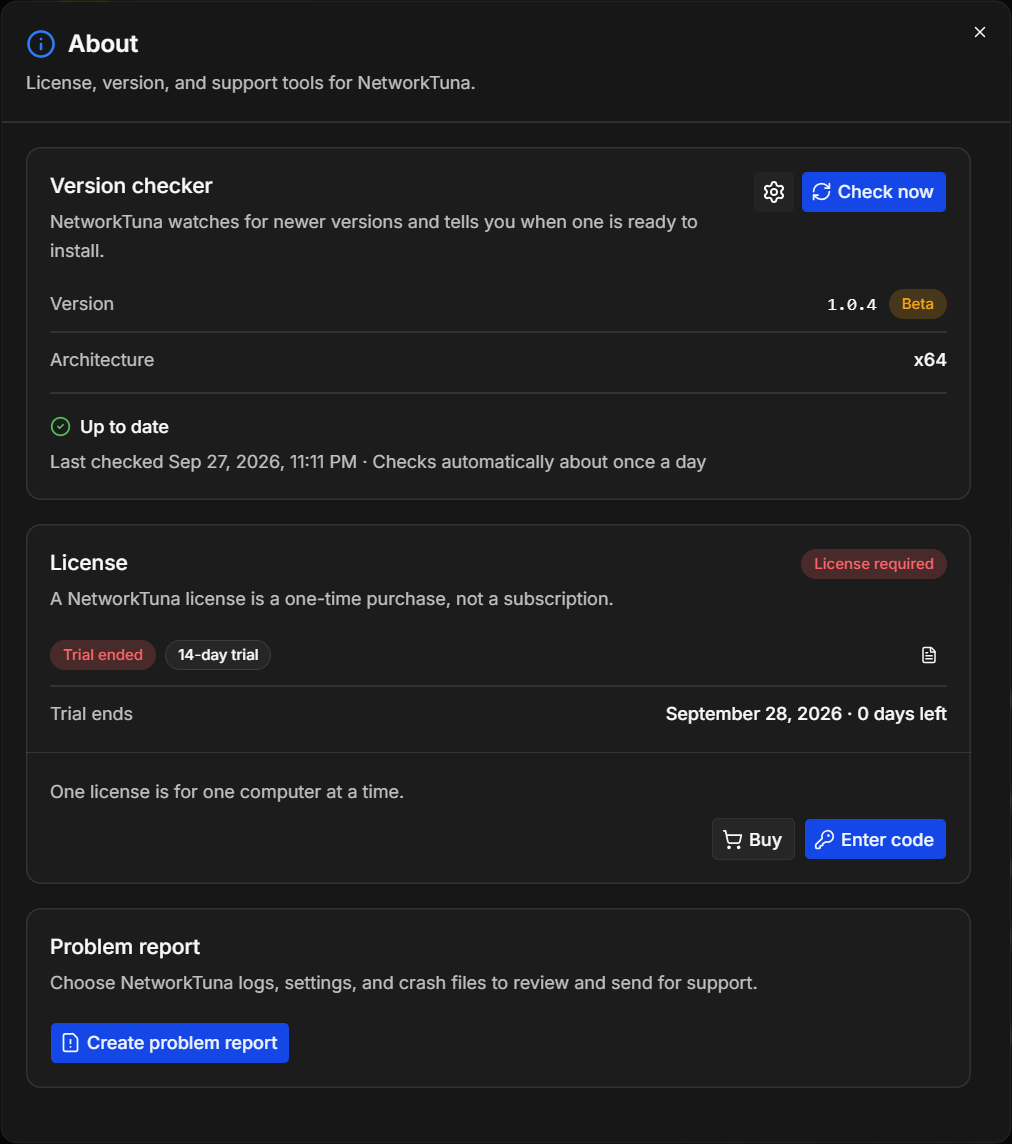
Your license is managed in the License section of the About window. To open it, choose About at the bottom of the sidebar, below Settings.
The trial
The trial starts when NetworkTuna first runs on your PC and lasts 14 days. During the trial, the License section shows Trial, and Trial ends shows the date and the days left.
Five days before the end, a notice appears at the bottom of the window, below every page: "Your NetworkTuna trial ends on …". Learn more opens About, and the × button hides the notice.
When the trial ends, the notice turns red and stays until you enter a license:

NetworkTuna keeps working after the trial. It still looks for suspicious activity and the app firewall still runs. The license terms require a license to keep using it, though. The Buy button in the notice opens the Buy page.
Buy a license
Licenses are sold on the Buy page of this website. The Buy buttons in the app, in About and in the notice, open it in your browser.
- Under Number of licenses, choose how many computers you want to use NetworkTuna on. One license is for one computer at a time. The more licenses you buy, the lower the price per license. See Pricing.
- If you have a coupon code, click Have a coupon code?, enter the code and click Apply.
- Click BUY. The secure checkout of Paddle.com opens, where you enter your email address and billing details and pay. The Buy page shows prices in euros before tax. Paddle shows the final tax and total before you pay.
- After the payment, the page shows Your license is ready with your Registration code. Click Copy code to copy it.
The registration code is also sent to the email address you entered at checkout. If the email does not arrive, check your spam folder. If you still cannot find the code, write to [email protected].
What a license includes
- A one-time payment, with no subscription or renewal fee
- A perpetual license that never expires
- All features and all future desktop versions of NetworkTuna, including major versions
- Use on one computer at a time. You can move it to another computer.
- A 28-day refund guarantee: within 28 days after the purchase, you can ask for a full refund through Paddle, for any reason
The license terms contain the details.
Enter your registration code
There is no separate installer for the full version. You enter the code in the NetworkTuna you already installed, during the trial or after it. The PC must be connected to the Internet.
- Choose About in the sidebar.
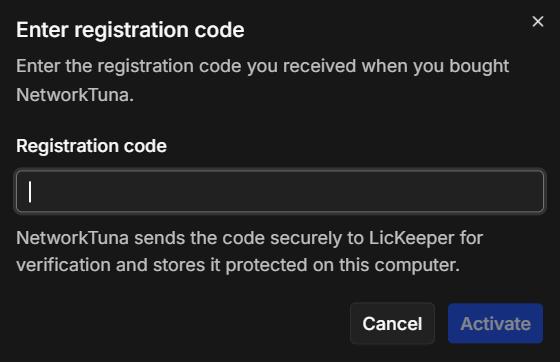
- In the License section, click Enter code.
- Paste the code into Registration code and click Activate.
NetworkTuna verifies the code online. When the code is valid, the License section shows Licensed:
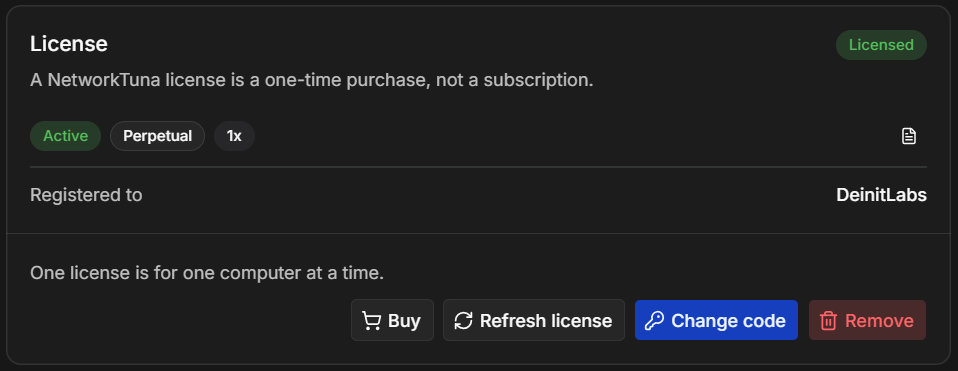
- Active means that the license is valid on this computer.
- Perpetual is the license type.
- 1x is the number of licenses the code covers.
- Registered to shows the name the license is registered to.
- The document button at the right opens License details. It also shows when NetworkTuna last verified the license, under Last verified.
If the code cannot be verified, the window shows why below the field:
| Message | What to do |
|---|---|
| This registration code could not be verified. | Copy the code again, without spaces or other text, and paste it. |
| NetworkTuna could not reach the licensing service. | Check the Internet connection and try again. |
| NetworkTuna could not establish a secure connection to the licensing service. | Check the Internet connection and that the PC's date and time are correct, then try again. |
| License verification is temporarily unavailable. | Try again later. |
Several licenses
If you bought several licenses, one registration code covers all of them. Enter the same code on each computer, on as many computers as you bought licenses for. The number in the License section, for example 5x, shows how many licenses the code covers.
Online verification
NetworkTuna verifies the license when you enter the code, and then again regularly in the
background. For this, it sends only the registration code and a random identifier of this
NetworkTuna installation to LicKeeper, the NetworkTuna license service at api.networktuna.com. It
sends no traffic, security or configuration data. NetworkTuna stores the code encrypted on this
computer, with Windows data protection.
Each verification is valid for a limited time. If the PC is offline for a while, the license stays active and NetworkTuna tries again later. If it cannot renew the verification in time, the License section shows Verification needed, and the notice at the bottom of the window says that NetworkTuna could not renew its license verification. NetworkTuna keeps working. Connect the PC to the Internet and click Refresh license in the License section.
Refresh license verifies the license right away and updates its details.
Move a license to another computer
One license is for one computer at a time. To move it:
- On the old computer, choose About, click Remove in the License section and confirm with Remove. NetworkTuna removes the registration code from that computer.
- On the new computer, enter the code.
To use a different code on this computer, for example after you bought a new license, click Change code.
License states
The badge at the top right of the License section shows the state of the license:
| Badge | Meaning | What to do |
|---|---|---|
| Trial | The trial is running. Trial ends shows until when. | Buy a license before the trial ends. |
| License required | The trial has ended, and no license has been entered. | Buy a license and enter the code. |
| Licensed | The license is active on this computer. | Nothing. |
| Verification needed | NetworkTuna could not renew the online verification in time. | Connect to the Internet and click Refresh license. |
| Revoked | The license is no longer valid. | Write to [email protected]. |
If you have a question about buying NetworkTuna or about your license, write to [email protected].